Why Google Ads for SaaS Is Different (and Harder Than It Looks)
The core structural problem is this: SaaS buying cycles are long. According to Dreamdata’s B2B customer journey research, the average B2B deal involves 10 stakeholders and takes 272 days from first touch to close. Basically, nobody is searching “best CRM software,” clicking your ad, and signing a $500/month contract in the same session. That is not how this works.
This makes SaaS Google Ads different from e-commerce, where someone searches “red sneakers size 9,” clicks the product ad, and buys in five minutes. Or local services, where intent-to-action is measured in hours. With B2B SaaS, you’re paying per click on a buyer who might not close for nine months, and who will talk to nine other people before they do.
Two things make it especially hard right now.
- First, supply constraints.
The pool of high-intent searchers for niche B2B SaaS products is small. If you sell project management software for architecture firms, only so many people are searching for it each month. You can’t just spend more to unlock more of the right buyers. You hit a ceiling faster than you expect.
- Second, market saturation.
Every software category on G2 now has dozens of competitors, all bidding on the same keywords. That competition pushes CPCs up and forces smarter strategy, not just higher ad spend. Throwing money at a mediocre setup doesn’t fix a structural problem.
The SaaS companies that win on paid search treat it as a precision channel. They know exactly who they’re targeting, what those buyers search for, and how to measure whether the click turned into revenue nine months later.
What Your SaaS Needs in Place Before You Launch Google Ads
Before you spend a dollar on Google Ads, make sure you check these off your list.
- Product-market fit is confirmed.
If you don’t have at least 50 to 80 repeat, paying customers, stop. Running Google Ads before PMF is how you burn $50,000 generating data that tells you nothing. The algorithm learns from conversion signals. Without a reliable signal (i.e., what a paying customer looks like), you’ll optimize toward form fills from people who churn in week two. Then Google will happily find you more of those… at scale. And cherry on the cake: happily use your money to do it.
- Conversion tracking is configured and tested before you spend a single cent.
This is the most boring prerequisite, but it’s also the most critical one. I cover it in the next section because it deserves a full breakdown, but the short version: if your conversion tracking isn’t set up correctly before launch, every optimization decision you make will be wrong. Fixing tracking after the fact is expensive and sets your account back months.
- You know your unit economics.
What is your target CAC? What’s your LTV? What payback period can your business absorb? Without these numbers, you cannot set a rational Google Ads budget or a defensible CPA target.
- You have dedicated landing pages.
Not your homepage, not a generic product overview, but dedicated landing pages built for specific campaigns. Conversion data confirms this repeatedly: homepage traffic from paid search converts at a fraction of what a purpose-built page achieves. More on this later.
Ready for takeoff?
Conversion Tracking and Offline Conversions: The Foundation of SaaS Profitability
Boring, I know 😅
Unfortunately, you can’t skip it. After auditing hundreds of SaaS Google Ads accounts, I’ll tell you the single most common reason they underperform: broken or incomplete conversion tracking.
Give or take, at least 80% of the SaaS accounts I audit are optimizing toward the wrong signal. At best, they track form fills and call it a day. Most have a mix of duplicate conversions, misconfigured events, and tracking that only captures the top of the funnel. Then they wonder why smart bidding isn’t working or why campaign performance is unpredictable.

You can get away with a lot being imperfect in Google Ads, but conversion tracking? Don’t even try.
Balancing Volume and Quality: Your #1 Job
Do you know what Google’s algorithm eats for breakfast, lunch and dinner (plus their occasional midnight snack)? Data. And the more conversion data you feed it, the better it gets at finding people who convert.
The quality side of the coin is this: the data you feed it has to be qualified. If all you feed it is form fills, it will keep finding you more form fills, including every freebie hunter, wrong-fit lead, and student doing a college project who ever visited your pricing page. And as you scale, this gets worse, not better.
The volume problem is the flip side. If you optimize purely toward closed-won revenue and you’re only closing 3 deals a month from Google Ads, the algorithm doesn’t have enough data to learn from, and performance becomes erratic.
Your #1 job in SaaS Google Ads is to find the right balance between these two: enough conversion volume for the algorithm to learn from, BUT from signals close enough to revenue to actually matter and make a difference for the business. Easier said than done, I know. And mind you, that balance WILL shift as your account matures.
Building a Conversion Hierarchy for SaaS
The way to solve the volume/quality problem is to track across the full funnel and feed smart bidding with the right tier for your current volume.
Here’s the four-tier hierarchy I use:
- Engagement actions.
Think pricing page visits, content downloads, scroll depth. Useful for top-of-funnel signal and audience building. Don’t bid toward these though! They should only be used to get the full picture.
- Lead conversions.
Aka demo requests, free trial signups. This is where most SaaS companies stop. Better than nothing, sure, but still disconnected from actual business outcomes.
- Microconversions.
This is the part most accounts (even the most advanced) often miss. If volume is low and you don’t have enough volume in your pipeline to feed the beast, you need to identify micro-conversions that happen between the lead stage and the pipeline stages. This can be as easy as account logins and as complicated as advanced lead scoring.
- Pipeline conversions.
Import MQLs, SQLs, opportunities, SALs from your CRM using offline conversions.
- Revenue conversions.
Closed-won deals with contract value attached. This is the data the algorithm actually needs to find you customers who pay. You might not have enough data when you start, but eventually, you will, so set it up from the beginning.
My recommendation is always to track all four in Google Ads. Which tier you bid toward depends on your conversion volume: start with the tier that gives you enough monthly data to hit the smart bidding thresholds below.
The Non Negotiable: Importing Offline Conversions from Your CRM
The qualifying process and the revenue event both happen in your CRM, not on your website. Without importing that data back into Google Ads, the algorithm is optimizing without knowing what happened after the form fill. Ever thought of never telling your marketing team which leads actually closed, so they can adjust their strategy? Exactly.

Google Ads trying to figure out what the h*ck it is you're trying to achieve
Here’s the workflow:
- Capture the click IDs (GCLID, GBRAID, WBRAID) at lead creation.
When someone submits a form from a Google Ad, store the Google Ad Click ID (GCLID), GBRAID, and WBRAID in your CRM alongside the lead record. This is the link between the ad click and the eventual deal.
- When a new conversion happens (microconversion, pipeline conversion, customer), export the click IDs and revenue values.
You now have a clear record: this click, from this campaign, generated this much revenue.
- Import that file into Google Ads.
You can do this manually via the offline conversion import tool, or automate it through your native CRM integration (if it has one).
Some CRMs (like HubSpot or Salesforce) have native integrations that automatically handle the whole process for you once you set it up. Even if yours doesn’t, this can and should always be done manually, at least every month. If there’s only one thing you can afford to do for your Google Ads performance, it’s this one.
Not sure how you can get it right? Maybe time to consider a SaaS Google Ads consultant (tbh, I’m the best to work with, but I might be just a little bit biased 🤭).
How to Structure Your Google Ads Account for SaaS
Outside of messy conversion tracking, account structure is one of the most expensive mistakes I see in SaaS Google Ads.
- Too fragmented and your campaigns can’t gather enough data to learn.
- Too consolidated and you lose targeting precision and budget control.
Get it wrong and you’re fighting the structure instead of optimizing performance.
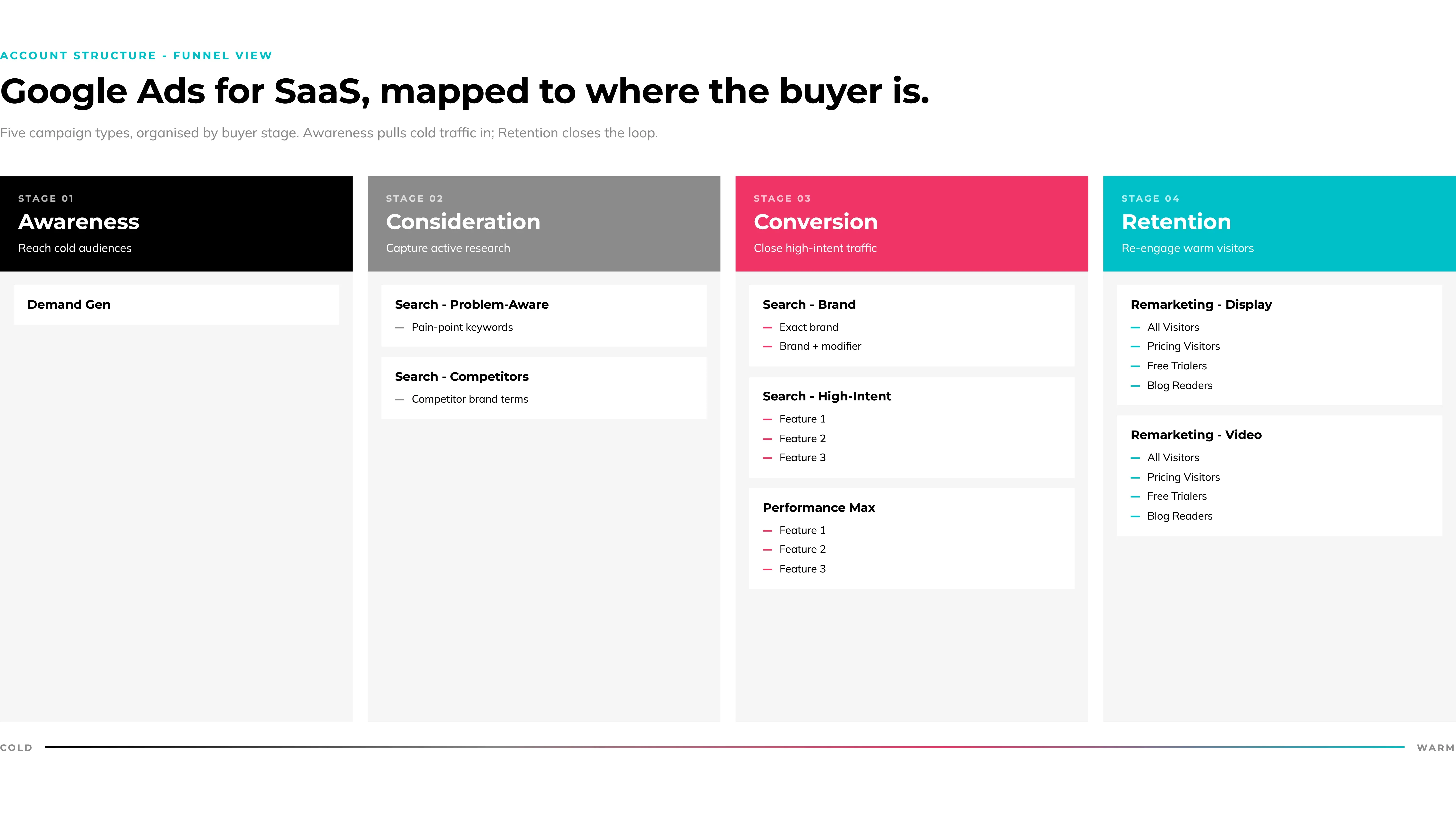
Every mature SaaS account should run five campaign types, each with its own budget, bidding strategy, and messaging. Here’s how they work.
Brand Campaigns (Search)
Brand campaigns target searches that include your company or product name. They typically convert at 15 to 30% with near-zero CPC compared to non-brand campaigns.
Are they incremental? You and I both know they probably aren’t. But they’re still required for 2 reasons:
- They feed the algorithm with more data. And data volume is exactly what you’re struggling with.
- Competitors bid on your brand terms. Without a brand campaign, a searcher looking for you by name might click a competitor’s ad before they ever reach your organic result.
My recommendations
- Keep brand and non-brand keywords in completely separate search campaigns.
Mixing them makes it impossible to manage bids accurately or read performance clearly.
- Allocate 10 to 15% of your total Google Ads budget to brand campaigns.
High-Intent Product Campaigns (Search)
These are the core revenue driver. You’re targeting bottom-of-funnel searchers in active solution mode.
“CRM software for sales teams”, “Best project management tool for agencies”, “Automated invoicing software”… these people know they have a problem, know they want software, and are evaluating options.
Conversion rates for well-structured high-intent SaaS campaigns typically run 4 to 8%, sometimes even more if competition is low.
My recommendations
- Allocate 40 to 50% of total spend to your high-intent search campaigns.
- Start with exact and potentially phrase match types (I find phrase to be very unreliable lately, but hey, you do you!).
- Do not use broad match until you have strong negative keyword coverage, an efficiency target in place (tCPA or tROAS) in your bid strategy, and enough conversion data that Google actually knows what a good conversion looks like. Broad match with no conversion history and no negative keyword list is how spend disappears with no attribution.
Competitor Campaigns (Search)
Competitor campaigns target searchers looking at your direct competition: “[Competitor] alternative,” “[Competitor] pricing,” “[Competitor] vs,” “[Competitor] review.”
These users are in active buying mode… just not for your product. So even if they are high-intent, expect CTRs to be lower (typically, 1 to 3%) and CPCs to run 2x higher than your other high-intent campaigns. You still have some convincing to do!
Two non-negotiables for competitor campaigns:
- You cannot use a competitor’s brand name in your ad copy.
You can use it as a keyword, but the ad copy can’t mention it (no, even if you’re adding “alternative”). Also, beware of ad customizers if you use them: stay away from them in this case!
- Direct these paid search campaigns to a dedicated comparison landing page built for someone switching from that specific competitor, or who already made up their mind to sign up with them.
A generic homepage kills the conversion rate on competitor traffic, even more so than with other campaign types.
Bonus tip: A switch incentive makes these campaigns work considerably harder: “Switch from [X] and get free onboarding” (or a discount for the first year).
You can allocate up to 15-20% of total spend to your competitor campaigns, depending on performance.
Not sure which competitors to target? The Auction Insights report in Google Ads shows exactly which domains appear alongside yours in the same auctions, ranked by impression share. Start there.
Remarketing is the highest-leverage campaign type for SaaS companies, directly because of those long sales cycles.
HockeyStack research puts the average B2B SaaS deal at 2,879 impressions and 266 touchpoints before close.
Remarketing is how you stay present across those touchpoints without paying full acquisition cost each time. Your brand needs to keep showing up while your prospect talks to their team, waits for budget approval, and compares you against five other tools.
If traffic volume allows it, segment your remarketing audiences by behavior (rather than treating all website visitors as one group):
- All website visitors (broad awareness).
- Pricing page visitors.
Use urgency messaging or social proof.
- Free trial started, but not converted.
Use feature education or a time-limited offer.
- Blog readers.
Nurture them with case studies and outcome proof.
Each audience segment gets different messaging because they’re in a different stage of consideration. Google Display Ads and Video ads make this possible at a fraction of your Search CPCs (even if they don’t always get the credit for it!).
Performance Max campaigns run across all of Google’s inventory (Search, Display, YouTube, Gmail, Maps, Discover, you name it!), with Google’s algorithm deciding where and who to target. One campaign to catch them all? Yes, please!
The pitch sounds compelling. But the reality for B2B SaaS is a bit more nuanced.
Fact: PMax is built to optimize for lead volume. For B2B SaaS, where one customer might be worth $50,000 in LTV, lead volume is not necessarily a win. And for a long time, PMax gave you almost no visibility into placement decisions or optimization logic, but I would argue that it has improved in the past few years, and it keeps improving.
Plus, Google now provides channel breakdowns in spend and conversion data, which makes it possible to actually understand where your money is being spent, what works, and what doesn’t, rather than just hoping for the best.
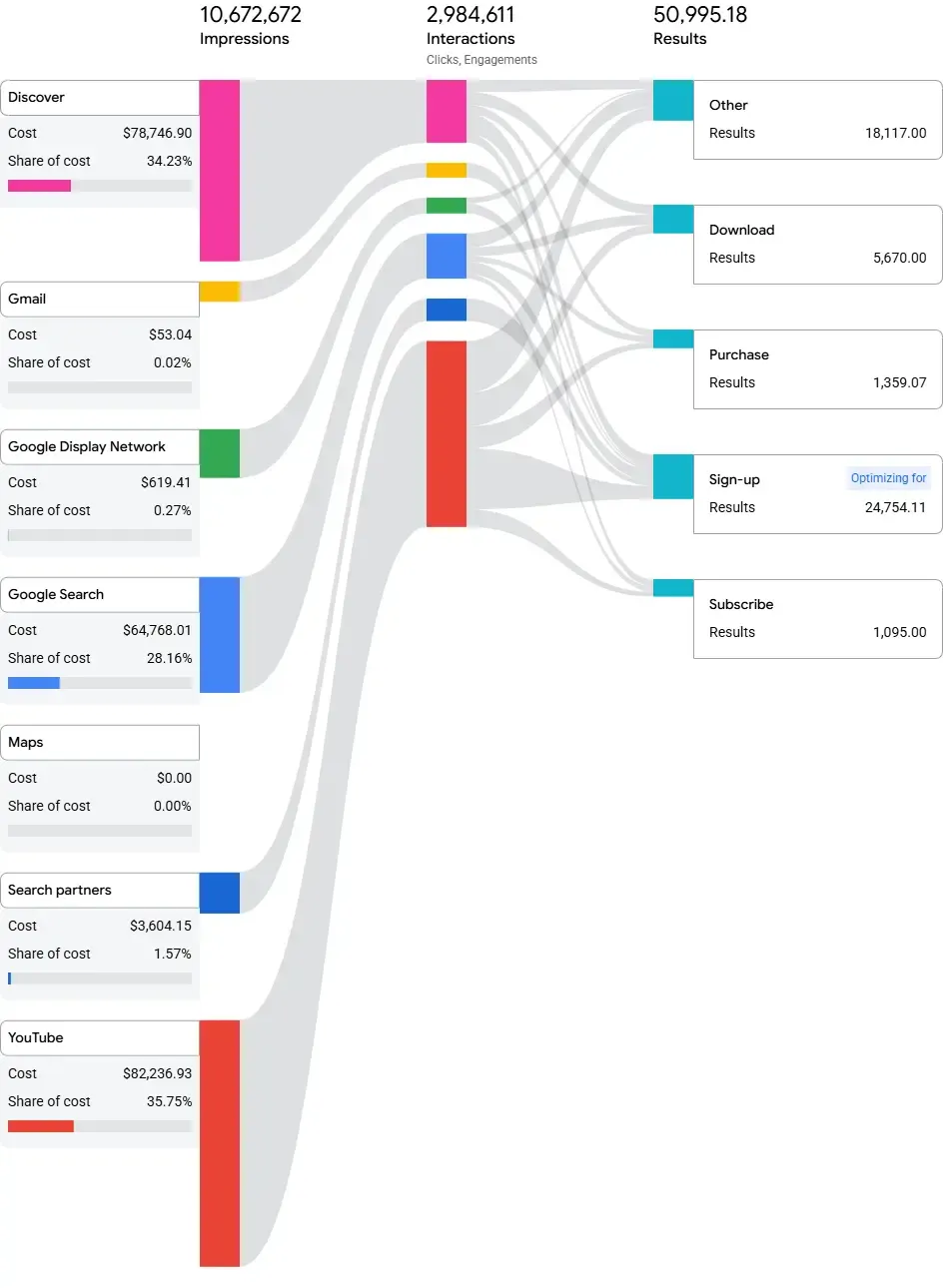
My recommendation: treat Performance Max as supplemental, not core, until you’ve saturated your bottom-of-funnel Search campaigns. In my experience, running PMax before your highest-intent Search campaigns are fully efficient and you have enough volume of conversion data is going to do more harm than good.
Last but not least: if you do run PMax, you need to feed it properly.
- Customer Match lists from your CRM (tell Google who your best customers are).
- Offline conversion data with actual revenue values, not just form fills.
- Creative assets focused on business outcomes, not feature lists.
All in all, PMax can work. But they need volume and good conversion data to work well, and you’d better saturate BOFU first.
Problem-Aware Campaigns (Search)
These top-of-funnel campaigns target searchers describing a pain, not a solution, e.g.:
- “How to manage client projects without spreadsheets”
- “Alternatives to manual invoicing”
- Etc.
Conversion rates are typically lower (2 to 5%), but they build pipeline for remarketing and can contribute to revenue downstream if your tracking maturity is there to measure it.
My recommendations
- Never set these up at the start of an account.
- Allocate 5 to 10% of total spend max.
- Use them with caution, and only while scaling.
Get bottom-of-funnel campaigns profitable first.
Honestly, in some accounts I never build these at all. Most of the time, the economics just don’t justify it.
Demand Gen Campaigns
One step further up the funnel, and significantly further down the road.
Demand gen campaigns reach audiences across YouTube, Gmail, and Discover with visually-driven content designed to build awareness before someone is actively searching.
Don’t expect direct-response results from these. They contribute to pipeline over longer timeframes, and attribution will always be partial. Run them only when you have the conversion infrastructure to measure their contribution and the budget to absorb results that take months to surface.
Keyword Research for SaaS Google Ads
Now that you know how to structure your account, how do you find and select the right keywords?
Your account structure determines how you organize campaigns. Keyword research determines what searches trigger them.
- Get keyword research and selection right, and your ad spend goes to buyers.
- Get it wrong, and you fund Google’s quarterly earnings report with traffic from bots, job seekers and students.
So how do you get it right?
Mapping Keywords to Funnel Stage
There are three keyword tiers for SaaS, each representing a different buyer intent.
- Bottom of funnel (solution-aware).
Behind these are searchers who know what type of software they need. “Project management software for agencies”, “HubSpot alternative for startups”, “Best automated invoicing platform”, and so on. These are your highest-intent, highest-converting keywords. Start here every time.
- Middle of funnel (problem-aware).
The searcher has the problem but hasn’t committed to software as the solution (e.g., “How to manage client projects without spreadsheets.”). These (obviously) show lower conversion rates, but they build pipeline from buyers who don’t yet know your category exists. I always leave them out while building an account; sometimes incorporate them while scaling (but typically rarely do).
- Top of funnel (category-defining).
These are broad terms like “project management”. High volume, high CPC, and rarely profitable. These attract researchers, students, and people nowhere near a buying decision. Stay away from them at all costs (pun intended).
Most SaaS campaigns should start at the bottom and work upward only after bottom-funnel campaigns are running profitably. This sounds obvious, but believe it or not, a lot of SaaS accounts I audit still have their budget split across all three tiers from day one.
Using Google Keyword Planner to Estimate Opportunity
Before you spend money, run the opportunity analysis.
Google Keyword Planner gives you three numbers that matter: average monthly searches, average CPC, and competition level. Use them to conduct keyword research and build a simple model before launch.
Available impressions (50-70% of total search volume) × estimated CTR × estimated conversion rate × average LTV = projected revenue potential
This analysis takes 30 minutes and saves months of expensive learning.
- If the math doesn’t work at even the optimistic end of your estimates, that keyword isn’t worth bidding on yet.
- If it works at conservative estimates, it’s worth testing.
The Google Ads keyword planner also shows adjacent terms and related searches that might not be on your initial list, which are worth reviewing before you finalize your first keyword set.
Review your list and build your ad groups around common topics (typically, one ad group = one search intent).
Negative Keywords: The Easiest Way to Cut Wasted Ad Spend
Negative keywords are what separate a profitable SaaS campaign from one that leaks budget constantly. Most SaaS companies add a handful at launch and never touch them again.
Common categories to identify negative keywords and exclude from day one:
- Job seekers: “jobs,” “salary,” “careers,” “hiring,” “job description”.
- Students and researchers: “free,” “tutorial,” “course,” “template,” “what is,” “how does”.
- Wrong industry modifiers: any vertical that isn’t your target market.
- Competitor names: if you’re not intentionally running competitor campaigns.
Build solid negative keyword lists at launch, then audit the search terms report every week. New irrelevant search queries surface constantly, especially after match type expansion, so you should keep excluding them when volume justifies it.
What About Audiences?
Audiences are often forgotten, but you can (and should) use them to your advantage.
- Set up audience exclusions from day 1.
Exclude current clients, existing MQLs, and known contacts from acquisition campaigns. You’re paying to find new customers, not remarket to people already in your pipeline (there’s a remarketing campaign for that!).
- Also add relevant audiences in observation mode from day one. That data becomes the foundation for your Display, Video, and Demand Gen campaigns as you scale.
Keep in mind that keyword strategy for SaaS is not a one-time task. The search terms report continuously surfaces new opportunities and irrelevant queries to exclude. Budget time for this every week, especially during the first 90 days.
Bidding Strategies for SaaS: A Progression Framework
Bidding strategy is a maturity model. The right strategy for a new account with no conversion history is completely different from the right strategy for an account generating 80 qualified leads a month. One of the most expensive mistakes I see: SaaS companies launch a brand-new Google Ads account and immediately set Target CPA bidding. Then they’re confused when performance is erratic and CPAs swing wildly.
The algorithm needs data to set bids intelligently. Give it a data-collection phase or it’ll guess. And Google is very good at spending your budget while it guesses.
Frame this section as a maturity model. SaaS companies should earn their way into more refined bid strategies by building conversion volume. Starting with Target CPA on a new account is one of the most common mistakes.
Manual CPC: When It Makes Sense (Not Always)
C’mon folks, it’s 2026! Who’s using manual bidding anymore? 🙄
Well, for niche, low-volume B2B SaaS accounts that are just starting off, don’t dismiss it too quickly.
If monthly search volume is thin and 10 to 15 conversions a month would be a stretch, manual CPC can make sense. It gives you direct control over bids across nine dimensions (keyword, device, time of day, day of week, location, audience, age, gender, and household income), and that granularity matters when you don’t have conversion data to trust an algorithm.
For most other accounts, starting on Maximize Clicks while you build conversion history is perfectly reasonable.
Graduating to Smarter Bidding Strategies: The Conversion Thresholds
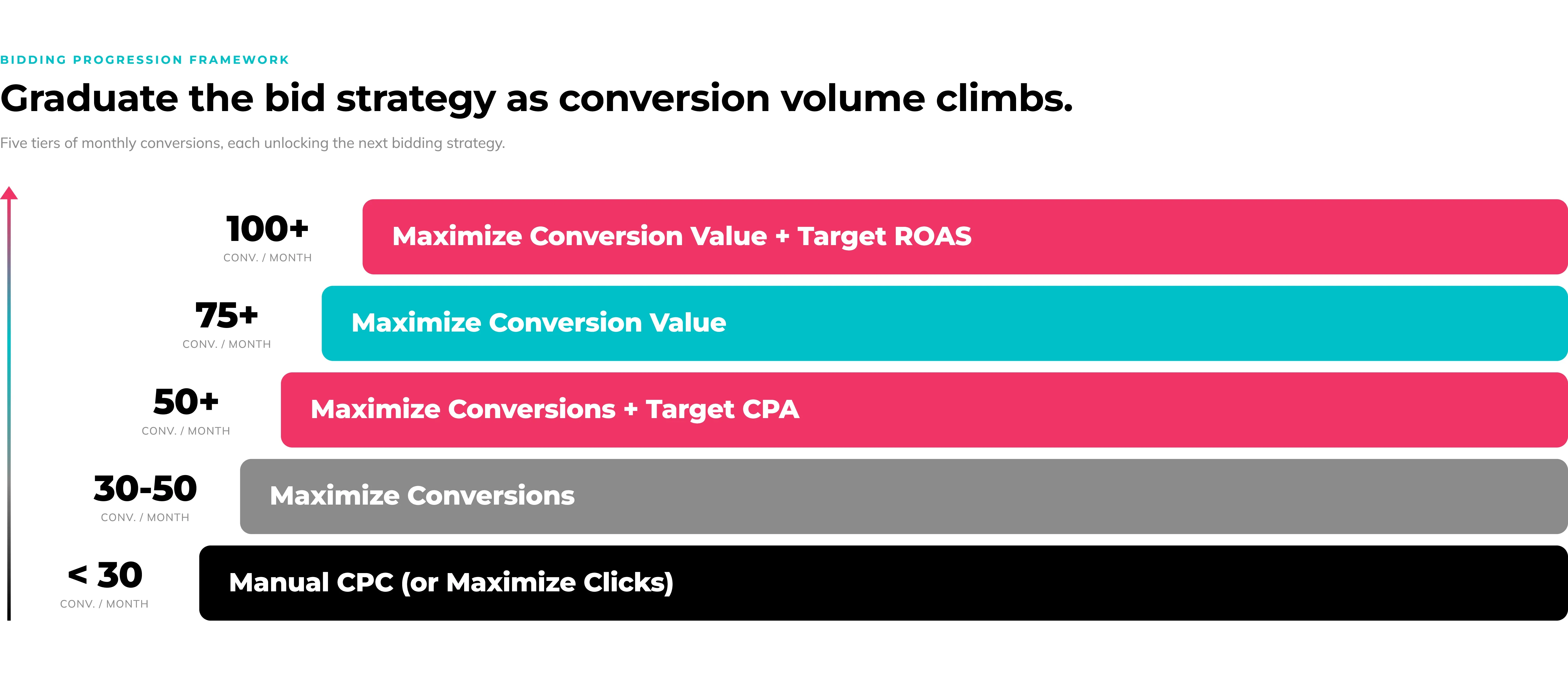
Here’s the progression framework for running Google Ads and graduating through automated bidding strategies that the PPC industry tend to agree on:
- Under 30 conversions/month: Manual CPC or Maximize Clicks.
- 30 to 50 conversions/month: Test Maximize Conversions.
In practice, I’ve seen Maximize Conversions work well at 15 to 20 conversions in well-structured accounts. Use your judgment based on what you’re seeing in the data.
- 50+ conversions/month: Try to add a target CPA and monitor the impact on both volume and efficiency.
- 75+ conversions/month: Maximize Conversion Value (only if CRM revenue data is flowing through offline conversion imports).
- 100+ conversions/month: If value-based bidding (Maximize Conversion Value) seems to be working for you, you can try to add a target ROAS and monitor the impact on both volume and efficiency.
Fancy some extra tips?
- Remember that these are guidelines, not rules.
Always prioritize the reading of your own data over generic advice.
- In this context, “Conversions” means real signals, such as demo requests, free trial signups, SQLs, not page views, scroll depth, or session duration.
If you’re counting those in your bidding setup, you’re teaching Google’s smart bidding to find people who scroll, not people who buy.
- Go slow.
Use Google’s Experiments feature to A/B test bid strategy changes before committing full budget.
- Give the algorithm a proper learning period after each change (at least two weeks, ideally much more).
Rushing because you’re impatient breaks performance that was just starting to work.
Writing Ad Copy That Converts SaaS Buyers
Most SaaS ad copy reads like a product brief: feature list, technical terminology, vague CTA. It describes what the product does instead of why a specific buyer should care today.
The ads that convert speak to a problem a specific person feels every day.
e.g., not “AI-powered pipeline management software”, but “Stop losing deals because your CRM is always three days out of date”.
Same product, completely different response.
Structuring Responsive Search Ads for SaaS
Responsive search ads give you up to 15 headlines and 4 descriptions. Google tests combinations from this pool of assets and serves the ones that perform best for each query.
The mistake most SaaS ad campaigns make: 15 headlines about features with no strategic structure. Ideally, you need to provide the maximum number of options allowed, and to use strategic variety across themes.
Organize your ad copy in five headline categories:
- Outcome-focused (2-3 headlines).
- “Close 40% More Deals This Quarter”
- “Onboard Clients in 24 Hours”
- Pain-point-focused (2-3 headlines).
- “Stop Losing Deals in Spreadsheets”.
- “End the Manual Data Entry”.
- Differentiators (2-3 headlines).
- “14-Day Free Trial, No Credit Card”.
- “Setup in Under 10 Minutes”.
- Social proof (2-3 headlines).
- “Trusted by 5,000 Sales Teams”.
- “Rated 4.9/5 on G2”.
- CTAs (2-3 headlines).
- “Start Free Today”.
- “Book a 20-Minute Demo”.
Don’t pin headlines unless there’s a compliance reason to do so: pinning limits Google’s ability to test combinations and usually hurts Ad Rank (which in turn increases your CPCs).
Targeting the Outcome, Not the Feature
Here’s the difference in practice.
- Before: “AI-Powered CRM with Pipeline Management and Automated Follow-Ups”
- After: “Stop Losing Deals Because Your CRM Is Always Out of Date. Try Free.”
The first tells a buyer what the software has. The second tells them what problem it solves today.
And guess what? The second consistently wins.
Specificity matters here too. “For Marketing Agencies” in a headline outperforms “For Businesses” by a wide margin, because it immediately tells the right buyer this is for them. It also tells the wrong buyer it isn’t, which improves the quality of your traffic, not just the volume. Remember that for SaaS companies paying $8 to $15 per click, traffic quality matters far more than it does for a $2 consumer product.
Ad Assets: The Free Upgrade Most SaaS Campaigns Skip
Ad assets (formerly called extensions) expand your ad’s footprint on the search results page at no extra cost (outside of the clicks they get you!). For SaaS, where competitor ads often look nearly identical, assets are the fastest way to stand out without touching bids or budgets.
Google rewards accounts that use relevant assets with better Ad Rank, which means better positioning in the auction and lower effective CPCs. Skipping them is just leaving free performance on the table.
Sitelinks, Callouts, and Structured Snippets
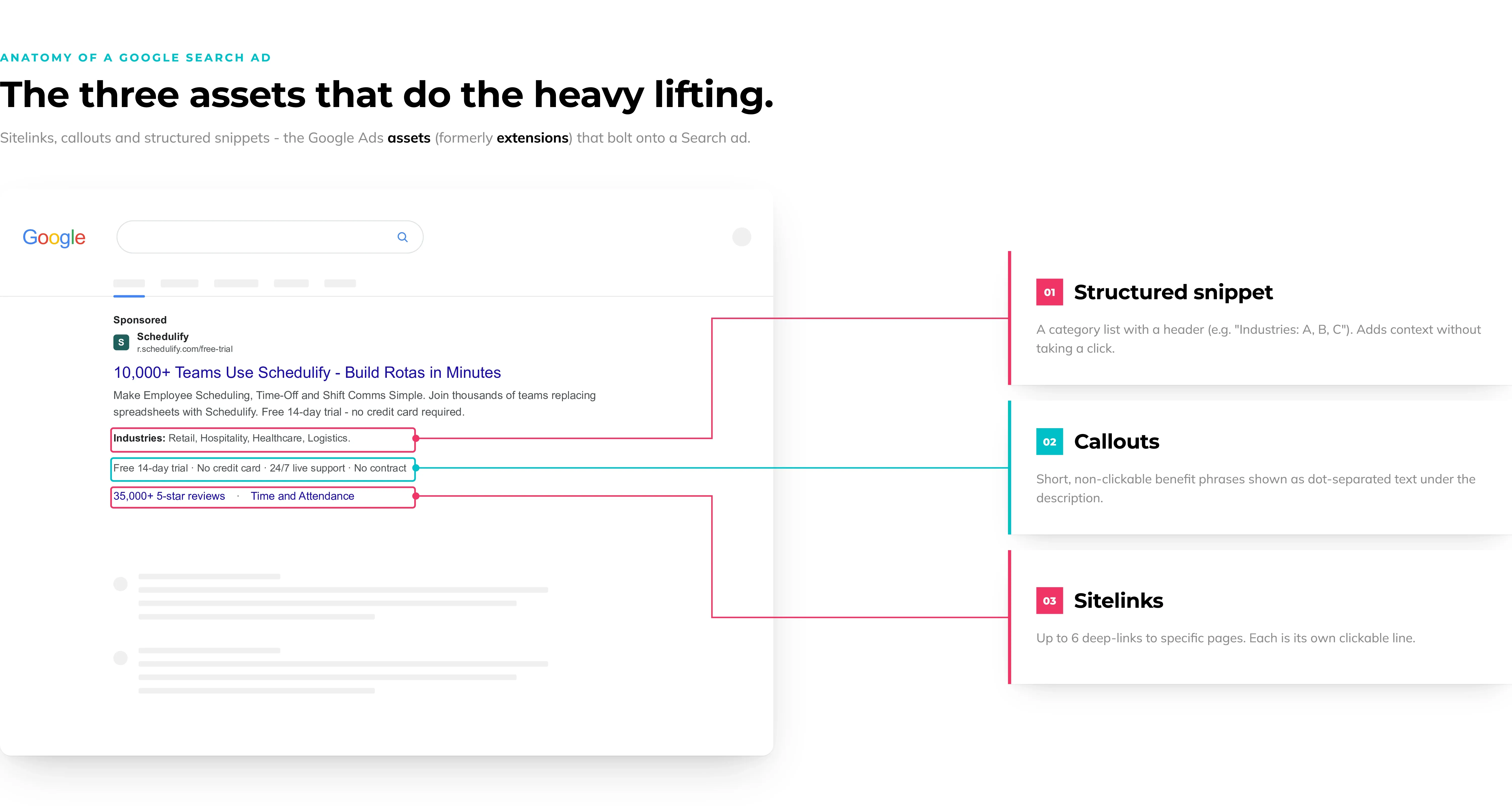
Sitelinks are clickable links below your main ad that take users to specific pages. For SaaS: Pricing, [Use Case] pages, Integrations, Case Studies, Free Trial. They do two things: let the right buyer self-select the most relevant destination, and give hesitant buyers a lower-commitment entry point (e.g., a case study instead of a demo form).
Callouts are short, non-clickable snippets for proof points that don’t fit in headlines. Think “SOC 2 Type II Certified”, “No Setup Fee”, “Onboarding in 24 Hours”, or “Cancel Anytime”. SaaS buyers tend to scan for risk reducers and trust signals before they click. Callouts are where you put them.
Structured snippets add a header and a list, e.g “Integrations: Salesforce, HubSpot, Slack, Zapier” or “Features: Pipeline Management, Deal Forecasting, Automated Follow-Ups.” They communicate platform depth without consuming headline characters.
Use all three in every Search campaign from day one.
Lead form assets let a user submit their name, email, and company directly from the Google search results page, without visiting your landing page.
For B2B SaaS running demo-request campaigns, this removes friction and can lower cost per lead noticeably.
The trade-off: leads captured via form assets typically show lower intent than leads who went through your landing page, because the user never saw your product. Best practice is to use them for middle-of-funnel campaigns where pipeline volume matters more than immediate qualification.
My honest advice? Always keep landing pages as the primary conversion path for your high-intent campaigns.
What a typical setup looks like
- 30-character headline.
- Description up to 200 characters.
- And a post-submit action.
Pro tip: Ask for name and work email only. Adding phone number or company size at this stage drops conversion rate more than it improves qualification.
One thing that consistently gets missed: leads captured via form assets won’t automatically appear in your CRM. Pull them from Google Ads and import manually, or connect via Zapier or native HubSpot/Salesforce integrations.
All in all, these can work well for the right account and campaign type, but test them heavily before committing significant budget.
Landing Pages: Where Most SaaS Campaigns Win or Lose
Sending paid search traffic to your homepage is one of the most common and expensive mistakes I see in SaaS Google Ads. And it happens in roughly half the accounts I audit. Ugh.

A homepage serves every possible visitor (investors, job applicants, existing customers, and prospects at every stage), while a high-converting landing page is built for one specific buyer with one specific intent.
Message Match and Dedicated Landing Pages
Message match means the headline on your landing page directly echoes the headline in the ad the user clicked.
If the ad says “CRM for Marketing Agencies,” the landing page opens with “CRM for Marketing Agencies.” Not “The CRM That Scales With Your Business.” Not “Welcome to [Product Name].” The precise intent the user was searching for, confirmed the moment they land.
When there’s a mismatch, the user’s first instinct is “this isn’t what I was looking for” and they leave. You paid for that click, and you get a bounce.
Dedicated landing pages built for each ad group outperform general pages, because if you structured your account the right way, each ad group targets a different intent. A searcher looking for “CRM for agencies” and one searching for “CRM for manufacturing companies” have different problems, use different language, and respond to different proof points. They should not land on the same page. Create landing pages specific to each campaign’s intent, and optimize landing pages as you gather conversion data.
What High-Converting SaaS Landing Pages Include
This could be a post on its own. To give you an overview, every high-converting SaaS landing page needs at least these six things:
- A headline that matches the ad.
- One primary CTA (arguably, a secondary CTA could be added if it matches the same intent).
- A product screenshot or demo visual above the fold.
- Social proof with specifics: named logos, a quoted result (“Increased pipeline accuracy by 60%”).
- A brief benefit-led description: what it does and who it’s for, in plain language.
- Landing page copy tailored to the search intent. Don’t just copy and paste (even though some sections can obviously be reused across all your landing pages).
What to stay away from: generic copy, endless list of technical features, long forms, and vague CTAs.
Adjusting your landing page approach will boost your conversion rates, which will in turn lower your CPA and CAC.
How to Scale Your SaaS Google Ads Budget Without Losing Efficiency
At some point, your CPA and CAC are hitting target and the question becomes: how do we spend more without breaking what’s working?
The answer is carefully, in phases, with specific triggers. Scaling too fast is a reliable way to watch your CPA or CAC climb 40% in a week while you pull your hair out trying to figure out what happened.
The Three Phases of SaaS Google Ads Scaling
Before you even start, you must accept the reality of diminishing returns: if the first $10K yield a 5:1 ROI, then the next $10K might yield a 4:1 ROI. This is expected (don’t act surprised!), but also 100% acceptable… as long as the absolute return still meets your CAC target.
You can always minimize it with smart structure, but you cannot eliminate it. Another hard pill to swallow, eh?
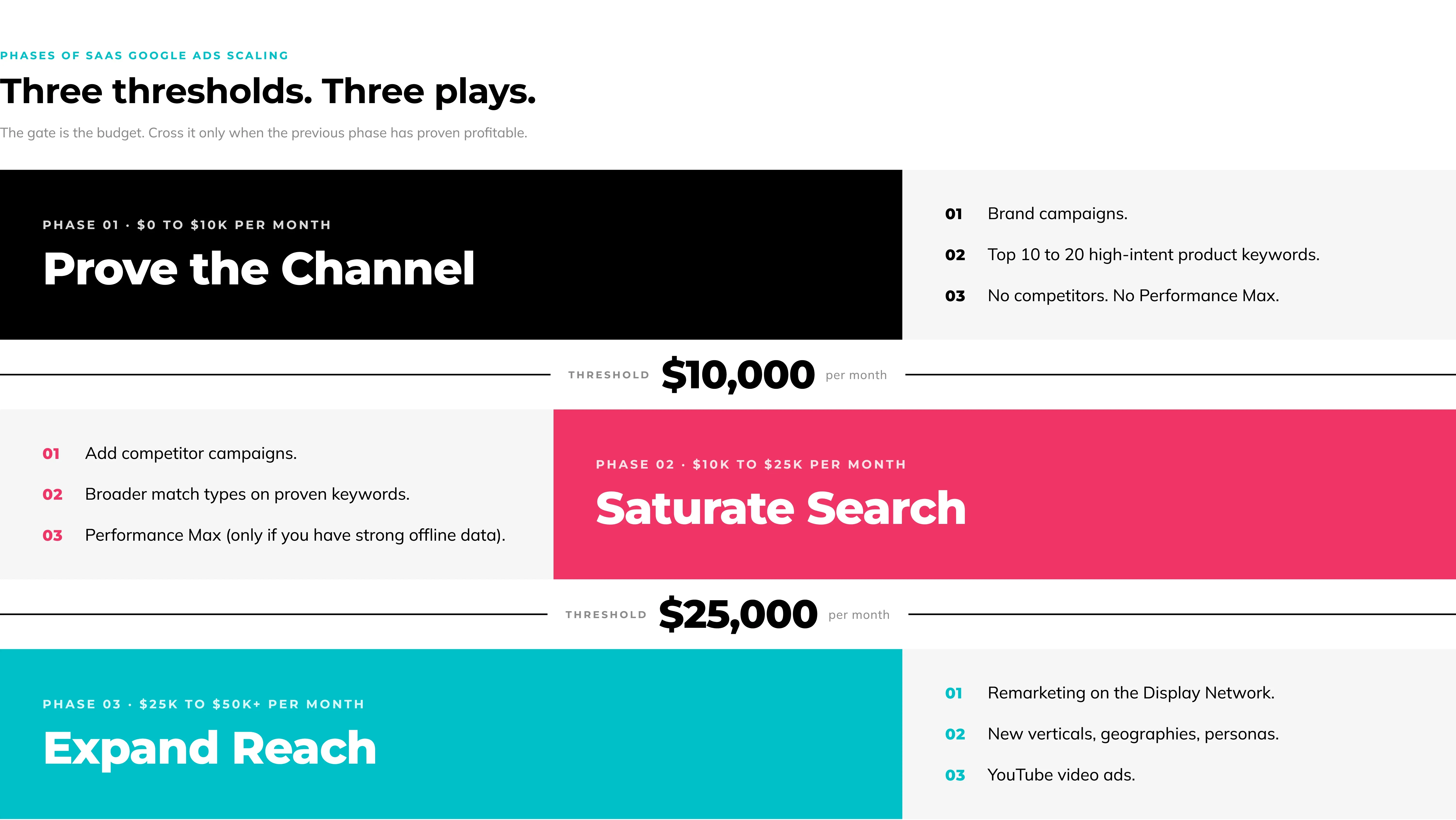
Phase 1 ($0 to $10K/month)
- Dominate your highest-intent keywords only: brand campaigns plus your top 10 to 20 high-intent product keywords.
- Prove the channel is profitable before expanding. Don’t touch competitor campaigns or Performance Max until Search is working.
Phase 2 ($10K to $25K/month)
- Add competitor campaigns.
- Expand to broader match types on keywords with proven conversion data.
- Consider Performance Max as a complement if your offline conversion data is strong and bottom-of-funnel Search campaigns are fully saturated.
Phase 3 ($25K to $50K+/month)
- Introduce remarketing on the Google Display Network. This is when Display starts contributing meaningfully to pipeline.
- Expand to adjacent verticals, new geographies, new buyer personas, and video ads on YouTube.
LTV:CAC as Your North Star Metric
SaaS companies should not optimize Google Ads towards ROAS or CPA in isolation. The right metric is LTV:CAC (customer lifetime value divided by customer acquisition cost).
A 3:1 LTV:CAC ratio is typically the industry minimum for a scalable acquisition channel.
- Below 3:1, you’re overpaying to acquire customers.
- Above 3:1, you likely have room to increase spend.
Use these numbers are rough guidelines. Your data is the only one that matters!
For most SaaS companies, tracking LTV:CAC quarterly and adjusting Google Ads budget targets accordingly is how you avoid the trap of optimizing the channel without knowing if the business is actually winning.
Ready to Get More from Your Google Ads?
Can Google Ads still work for SaaS in 2026? Yes, 100%. But only when the fundamentals are right: conversion tracking that feeds the algorithm real revenue signals, a campaign structure built around intent stages, landing pages that match your ads, and a bid strategy that aligns with your account’s maturity.
When any one of those is missing, Google Ads for SaaS leak budget and produce data that looks like activity, but generates no pipeline (let alone revenue!).
If you’re not sure where your account is losing money, or you want a second pair of eyes on your campaign structure, tracking setup, and bidding decisions, book a free Google Ads strategy call with me.
You’ll get:
- A focused review of your specific account: where your conversion tracking stands, whether your campaign structure matches your funnel, where your current spend is working versus where it isn’t.
- An expert conversation about your setup and what it would actually take to make it profitable.
- A clear set of next steps you can act on immediately.
Time to chat?